


What the new AI Assistant channel in GA4 actually shows you.
If you want to know how to track AI traffic in GA4, it just got a lot easier. In May 2026 Google added a new AI Assistant channel that automatically picks out visitors arriving from chatbots like ChatGPT and Gemini, instead of leaving them hidden. Here we explain what that channel shows you, how to find it in your reports in two different ways, and where it falls short. At Sokada, we build bespoke websites and run the marketing alongside them, joined up rather than as two separate things, and a big part of that now is making sure businesses get picked up by AI and how we report on this.
Most business owners have never once looked at where their visitors come from.
Here is the bit that always surprises people. Most business owners have never opened their GA4 analytics. Not once. The website went live, somebody set up tracking, and that was that. So when we ask a simple question, where are your enquiries actually coming from, the answer is usually a shrug. This is something we always do with our new websites, but if we start working with you on your current website and are dealing with SEO and digital marketing then we check it here too.
And even if you have stats set up, have key events been included?
That was a problem before AI. It is a bigger problem now. AI search is changing how people find businesses, and the traffic it sends is starting to show up in the numbers. If you never look at the numbers, you will be the last to know it is happening, you will not be able to tell which of your pages are getting picked up, and you will keep guessing about what is working instead of actually knowing. The whole point of marketing is more enquiries, and you cannot connect the work to the enquiries if you never check.
How GA4 sorts your traffic, and where AI used to disappear.
To make sense of the new channel, it helps to know how GA4 organises things. Every visit gets sorted into a bucket called a channel. Organic Search, Direct, Paid Search, Referral, Social, and so on. It is GA4 deciding, in easy terms, how someone found you.
The trouble was that AI never had a bucket of its own. When somebody clicked through to your site from a chatbot, that visit got scattered. Some of it landed in Referral, lumped in with every other website that links to you. A lot of it landed in Direct, the bucket GA4 uses when it cannot work out where someone came from. To find any of it you had to go digging, source by source, or build custom rules and hope you had caught everything. For most businesses that meant AI traffic was effectively invisible, even as it grew from almost nothing to a real share of visits over the past year.
What changed in May 2026.
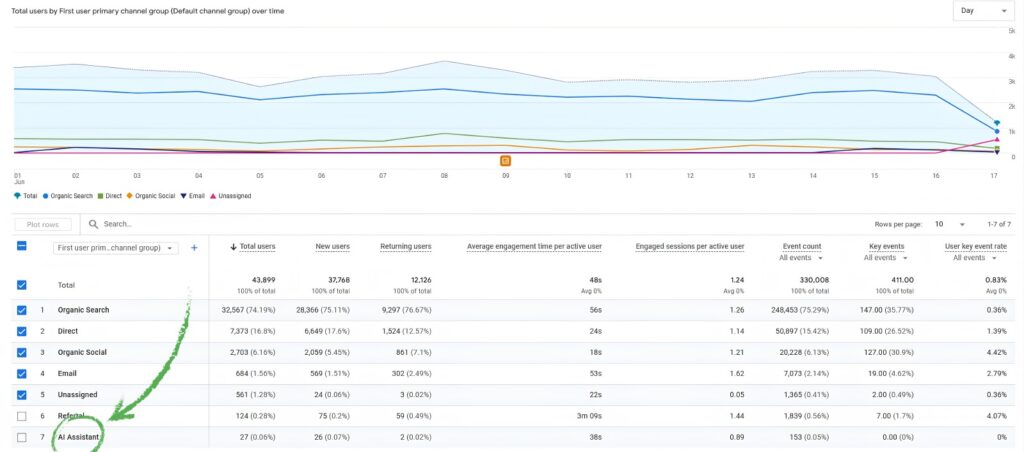
On 13 May 2026 Google added a new AI Assistant channel to GA4, confirmed in its official Analytics Help documentation. The best part is there is nothing to set up. It works automatically on every property.
When GA4 spots a visit arriving from a recognised AI assistant, it now does three things on its own. It sets the medium to ai-assistant, it groups the visit under a new AI Assistant channel in your reports, and it tags the campaign as (ai-assistant). You do not touch a thing.
A few caveats are worth knowing, because they explain a lot of confused conversations we have been having.
First, it only counts forward. GA4 does not go back and reclassify your old data, so anything before 13 May 2026 stays in whatever bucket it landed in at the time.
Second, the rollout was staggered. The feature landed in May but only reached most properties around 7 June 2026, which is why you might see an AI Assistant channel appear on some accounts and not yet on others. Over the past few weeks we have started to see it turning up in the acquisition reporting on some of our accounts, while others are still catching up. If it has not appeared on yours, it may simply not have reached your property yet, or you may not have had a recognised AI referral land since it went live.
Third, the list of assistants is moving. Google named ChatGPT, Gemini and Claude when it launched the channel, but its live documentation has since listed ChatGPT, Gemini, DeepSeek, Copilot and Grok, and it says the list will keep changing as the market does. So do not treat any list as fixed. Check Google’s own help page on the day you want the current set.
Importantly, Google’s own AI Overviews and AI Mode, the AI answers that appear inside a normal Google search, are not counted here at all. They stay in Organic Search.
How to track AI traffic in GA4 with the new AI Assistant channel.
The most dependable place to look on any account is the Traffic acquisition report, because the new channel works at session level. There are two views worth knowing. One gives you the headline, the other tells you which assistant is actually sending you people.
Finding the AI Assistant channel in your reports.
This is the quick headline view. It tells you whether AI is sending you sessions at all.
Open Reports, then Acquisition, then Traffic acquisition.
Set the primary dimension at the top of the table to Session default channel group.
Look down the list for a row called AI Assistant.
If it is there with sessions against it, AI is sending you traffic and GA4 is now naming it for you. If there is no AI Assistant row, that usually means one of two things. Either the channel has not reached your property yet, or you have had no recognised AI referrals with a proper referrer since it went live. Either way, the next view is the one to look at.
Breaking it down by source and medium.
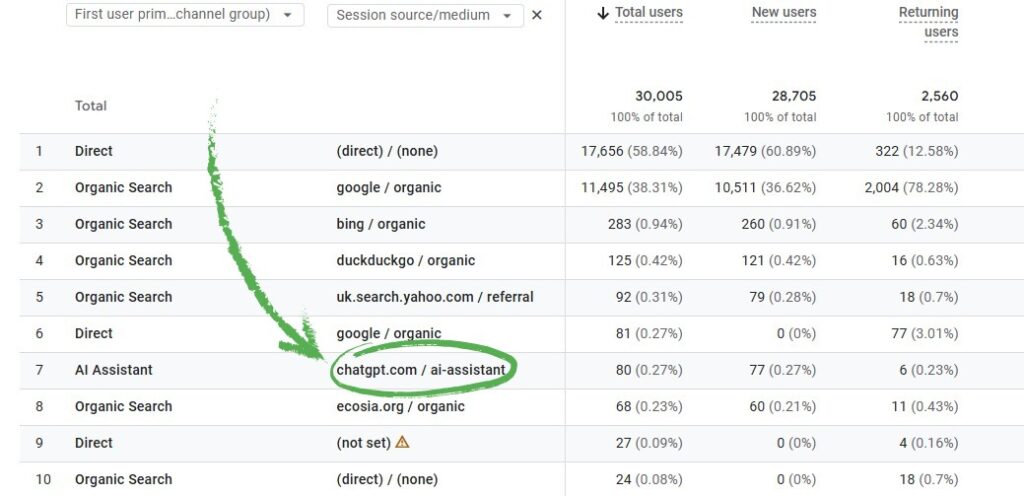
This is the view we use most, and the one most people never find. The channel tells you that AI sent you visits. Source and medium tells you which assistant, which is far more useful when you want to know whether your content is being picked up by ChatGPT, Gemini, Perplexity or the rest.
Stay in Reports, Acquisition, Traffic acquisition.
Change the primary dimension from Session default channel group to Session source / medium.
Use the search box just above the table and type a name, one at a time. Try chatgpt, gemini, perplexity, copilot, claude.
What you are looking for is the source paired with the medium. Recognised AI visits now carry the ai-assistant medium, so you will see entries such as chatgpt.com / ai-assistant. That tells you the assistant and confirms GA4 has classified it as AI. Anything still showing as something like perplexity.ai / referral is AI traffic that has not been folded into the new channel, which brings us neatly to the catch.
Why the number you see is a base, not the full picture.
We would rather show a client an honest small number than a flattering big one, so this part is important. The AI Assistant channel is genuinely useful, but it is the visible tip of your AI traffic, not the whole of it. There are three gaps, and they are not all the same kind of gap.
The first is Perplexity. It is one of the highest intent AI sources around, the kind that sends people who have already read about you and clicked through on purpose. It is not in the native channel, so it still lands in Referral. You can catch it, but it takes a bit of setup rather than appearing on its own.
The second is Google’s own AI. The AI Overviews and AI Mode answers that show up inside a normal Google search are counted as Organic Search, not as AI. For a lot of businesses that is probably the biggest slice of AI influence of all, and none of it shows in this channel. Seeing that properly is a Search Console job, not a GA4 one.
The third is the awkward one. A large share of AI clicks arrive carrying no information about where they came from, so GA4 cannot identify them and files them under Direct. It happens because mobile apps and some AI browsers strip that information out, and because people copy and paste links rather than clicking them. Industry estimates put this somewhere around sixty to seventy per cent of real AI sessions, which means the channel almost certainly undercounts.
So treat the AI Assistant number as a base, the bit you can see, and say so plainly whenever you report it.
Anyone who tells you GA4 now shows all of your AI traffic has not read the small print!
Why checking your stats is the whole point.
So why does any of this matter if the picture is incomplete. Because with a base you can watch every month beats a complete picture you never open. The businesses that do well as AI search grows will be the ones paying attention to the trend, not the ones just guessing.
Seeing AI traffic appear is proof that your content is being picked up and cited by these tools, and that the citations are turning into actual visits. Watching it climb tells you the on-page work, the structure, the schema, the clear answers near the top of a page, is doing its job. Watching it sit at zero tells you something too, that your site is not yet built in a way these tools can quote, which is work worth doing. None of that is visible from the front of the website. You have to look.
This is exactly why we keep saying a website and its marketing have to be joined up and measured properly, not handed off as separate boxes to tick. The enquiry is the only thing that counts, and your stats are how you trace it back to what earned it.
What to do if AI is, or is not, sending you business yet.
If you check and AI is already sending you visits, that is a good sign. Keep building the kind of clear, genuinely useful content these tools like to quote, and keep an eye on the trend month on month. If you check and there is nothing there, do not panic. It usually means your site is not yet structured to be found and cited, which is fixable with proper on-page and AI search optimisation work.
Either way the move is the same. Set up clean measurement so you can see what is happening, then do the work that earns the enquiries. If you would like a hand with either, our lead generation service is built around exactly that so please speak to us.
Learning to track AI traffic in GA4 is a small habit with a big payoff, because it turns AI search from something you vaguely worry about into something you can see, measure and improve. If you are not getting as many enquiries as you would like, and you are not sure whether AI is part of the answer, that is what we are here for.
Book a free lead generation website and we will look at your numbers properly and tell you, in an easy to understand way, where your enquiries are coming from and where they are dropping off.
FAQs.
It is a new channel in GA4 that automatically groups visits arriving from recognised AI chatbots, so you can see AI traffic separately instead of it being mixed in with Referral or Direct. Google added it on 13 May 2026 and it needs no setup.
Open Reports, then Acquisition, then Traffic acquisition. Set the primary dimension to Session default channel group and look for the AI Assistant row for the headline. To see which assistant is sending the traffic, switch the dimension to Session source / medium and search for names like chatgpt or gemini.
Google named ChatGPT, Gemini and Claude at launch, and its live documentation has since listed ChatGPT, Gemini, DeepSeek, Copilot and Grok. The list keeps changing, so check Google’s own help page for the current set rather than relying on a fixed list.
Perplexity is not part of the native channel yet, so its visits still land in Referral, usually showing as perplexity.ai / referral in your source and medium view. You can capture it, but it takes a bit of extra setup rather than appearing on its own.